
Download WriterZen – SEO Content Creation Tool, Keyword Research, AI Writing
Overview
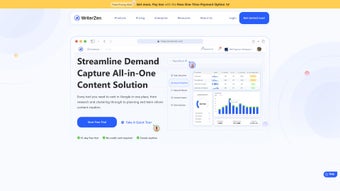
WriterZen is a cloud‑based SEO content workflow platform that aims to simplify every step of the content creation journey. From the moment you land on the dashboard, the tool guides you through topic discovery, keyword research, article drafting, AI‑assisted writing, and final optimization. What sets WriterZen apart is its integrated suite of modules—Topic Discovery, Keyword Explorer, Content Creator, AI Assistant, and Plagiarism Checker—each designed to work in harmony without the need for multiple subscriptions.
Whether you are a seasoned SEO professional or a beginner trying to rank your first blog post, WriterZen offers a clear, step‑by‑step workflow that reduces the time spent on manual research and improves the quality of the final copy. The platform also hosts an extensive Academy, a regularly updated blog, live webinars, and real‑world case studies that help users stay ahead of algorithm changes and industry trends. Recognized by outlets such as Mashable and PCWorld, WriterZen has earned a reputation for being both powerful and user‑friendly.
Its AI Assistant, powered by OpenAI’s GPT‑3, can generate content outlines, rewrite sentences, and suggest LSI keywords, while the built‑in plagiarism detector ensures every piece remains 100 % original. In short, WriterZen is a one‑stop shop for anyone looking to produce high‑quality, SEO‑optimized content that drives organic traffic, saves time, and scales content production without sacrificing relevance or authenticity.
Key Features, Pros & Cons
- Topic Discovery – AI‑driven idea generator that surfaces high‑potential niches based on search intent and competitor analysis.
- Keyword Explorer – Advanced keyword research with clustering, search volume, CPC, difficulty score, and SERP features.
- Content Creator – Structured writing environment with content blocks, SEO checklist, and real‑time readability scoring.
- AI Assistant – GPT‑3 powered helper for drafting, expanding, or rephrasing paragraphs, and suggesting related keywords.
- Plagiarism Checker – Integrated scanner that compares your text against billions of web pages to guarantee uniqueness.
- Competitive Insights – Side‑by‑side comparison of top ranking pages, backlink profiles, and content gaps.
- Automated Keyword Clustering – Groups related keywords into silos for better topical authority and internal linking.
- Academy & Resources – Video courses, webinars, case studies, and a blog that keep you updated on SEO best practices.
- Collaboration Tools – Team workspaces, comment threads, and version history for seamless editorial workflows.
- Export Options – Direct export to WordPress, CSV, PDF, or plain text for publishing flexibility.
Pros
- All‑in‑one platform eliminates the need for separate keyword and content tools.
- AI Assistant significantly speeds up drafting and ideation phases.
- Robust plagiarism detection protects against duplicate content penalties.
- Intuitive UI suitable for both beginners and advanced SEOs.
- Extensive learning resources reduce the learning curve.
- Regular updates and feature releases keep the tool future‑proof.
Cons
- Being web‑based, a stable internet connection is required at all times.
- Advanced features such as competitive insights are locked behind higher‑tier plans.
- AI suggestions occasionally need manual refinement for brand voice consistency.
- Export formats are limited compared with some desktop‑only SEO suites.
- Pricing may be a barrier for freelancers on a very tight budget.
Installation, Usage & Compatibility
WriterZen is delivered as a SaaS (Software‑as‑a‑Service) solution, which means there is no traditional installation process. Users simply create an account at writerzen.com, verify their email, and log in through any modern web browser. The platform is fully responsive and works flawlessly on desktop browsers (Chrome, Firefox, Edge, Safari) as well as on tablets and smartphones. Because it runs in the cloud, WriterZen is compatible with Windows 10/11, macOS, Linux, iOS, and Android devices, making it a truly cross‑platform solution.
Getting started is straightforward: after logging in, the onboarding wizard asks a few questions about your niche, target audience, and content goals. Based on your answers, WriterZen recommends an initial workflow—starting with Topic Discovery, moving to Keyword Explorer, and then feeding the data into the Content Creator. Each module includes contextual tooltips, video guides, and a “Help” button that links directly to the Academy article relevant to the current step.
For teams, administrators can invite members, assign roles (admin, editor, writer), and set permission levels from the “Team Settings” page. Collaboration features such as real‑time comments, change tracking, and task assignment are built into the interface, allowing multiple users to work on the same piece without overwriting each other's work. When the article is ready, you can either publish directly to a connected WordPress site via the built‑in API or export the file in your preferred format.
Supported operating systems: Windows 10/11, macOS 10.15+, Linux (any modern distro), iOS 13+, Android 8+. Requires a stable internet connection and a modern browser that supports JavaScript and HTML5.
Frequently Asked Questions & Conclusion
Is WriterZen a free tool or does it require a subscription?
WriterZen offers a 7‑day free trial that gives you full access to all features. After the trial, you need to choose a paid plan (Starter, Professional, or Agency) which is billed monthly or annually. There is no permanently free tier, but the trial allows you to evaluate the platform risk‑free.
Can I use WriterZen on multiple devices simultaneously?
Yes. Since WriterZen is cloud‑based, you can log in from any device with an internet connection. Your projects, settings, and history are synced in real time across all logged‑in sessions.
How accurate is the AI Assistant’s content generation?
The AI Assistant leverages OpenAI’s GPT‑3 model, which produces high‑quality, human‑like text. While it can generate solid first drafts and ideas, it’s recommended to review and edit the output to align with your brand voice and SEO strategy.
Does WriterZen provide any backlink analysis?
Backlink analysis is not a core feature of WriterZen. However, the Competitive Insights module includes a summary of top ranking pages’ backlink profiles sourced from third‑party APIs, giving you a quick overview of link opportunities.
What kind of customer support does WriterZen offer?
WriterZen provides 24/7 email support, live chat during business hours, and an extensive knowledge base. Premium plans also receive priority support and a dedicated account manager.
Conclusion & Call to Action
In a market saturated with fragmented SEO tools, WriterZen stands out as a comprehensive, user‑centric platform that brings every stage of content creation under one roof. Its blend of powerful keyword research, AI‑enhanced writing, and built‑in plagiarism detection makes it a valuable asset for marketers, agencies, and solo entrepreneurs alike. While the subscription cost may be a consideration for very small budgets, the time savings, improved content quality, and higher ranking potential typically offset the investment. If you’re ready to accelerate your SEO content workflow, streamline collaboration, and produce articles that both search engines and readers love, now is the perfect moment to try WriterZen.
Start your free 7‑day trial today and experience the difference. Click the button below, create your account, and unlock a world of data‑driven content creation.
WriterZen delivers a robust set of features that cover the entire SEO content lifecycle. The AI Assistant speeds up drafting, the keyword clustering saves countless hours of manual work, and the plagiarism checker provides peace of mind. The only drawbacks are the need for an internet connection and the premium pricing for advanced modules. Overall, it’s a highly recommended tool for anyone serious about scaling organic traffic.



.png)



